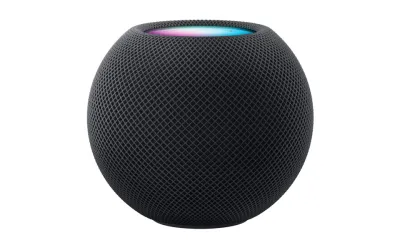
I've been using the HomePod Mini as my main kitchen speaker for about eight months now, and it's become one of those products I have a complicated relationship with. As someone deep in the Apple ecosystem -- iPhone, MacBook, Apple TV -- I expected it to slot right in and just work. In some ways, it absolutely does. The sound quality punches above its weight, the design is delightful, and features like Intercom have become indispensable in our household.
But then there's Siri. And the HomeKit limitations. And the baffling decision to exclude Bluetooth audio entirely. The HomePod Mini feels like a fantastic speaker trapped inside a frustrating smart home device, and whether that tradeoff works for you depends entirely on how much patience you have for Apple's walled garden.
Design & Build
Credit where it's due: the HomePod Mini is a beautiful object. The mesh fabric wrapping the spherical body has held up remarkably well after eight months of kitchen duty -- no staining from cooking steam, no visible dust accumulation, and it still looks fresh. At just 3.3 inches tall, it's compact enough to fit on a narrow shelf without dominating the space, but substantial enough to feel intentional rather than like an afterthought.
The touch-sensitive top panel is where you interact with the speaker, and Apple nailed the subtlety. Tap the center for play/pause, the plus and minus for volume, and everything responds with satisfying haptic confirmation. A glowing LED array shows Siri's listening state and volume changes. It took a few days to internalize the touch targets, but now it's completely second nature.
The braided power cable is high quality but permanently attached, which is annoying if you ever need to reroute it. My bigger complaint is the absence of a physical mute button. For a company that stakes its reputation on privacy, making users rely on a voice command or the Home app to disable the microphone is an odd oversight. The Sonos Era 100 has a dedicated mic button right on top -- I wish Apple had done the same.
Features
The HomePod Mini's feature set splits sharply between Apple ecosystem users and everybody else. If you're in the first camp, there are legitimately useful capabilities. Handoff is my favorite -- I can transfer a phone call or whatever I'm listening to just by holding my iPhone near the speaker. Intercom is another genuinely practical feature my family uses daily to communicate across rooms. It works with HomePods, iPhones, Apple Watches, and AirPods.
But Siri is still not good enough to be a primary smart assistant. Speech recognition is maddeningly inconsistent -- "Hey Siri, play some jazz" has produced everything from random podcasts to stock market updates. Multi-step commands are unreliable. Compared to Alexa on the Era 100, the gap in natural language understanding is noticeable.
Smart home control is limited to HomeKit-compatible devices. I had to buy a Starling Home Hub to get my Nest thermostat working, which felt absurd. If your devices aren't HomeKit-native, you're buying bridge hardware or running Home Assistant with the HomeKit Bridge to fill gaps. The absence of Bluetooth audio means non-Apple devices simply can't play music on your speaker. It's AirPlay or nothing.
Multi-room audio works when it cooperates, but I've experienced random dropouts I never encountered with Sonos. Music occasionally stutters or one speaker falls behind. It always resolves, but it happens often enough to be annoying.
Performance
Sound quality is the HomePod Mini's strongest argument for existence. The computational audio processing produces a soundstage that feels much wider than a 3.3-inch sphere has any right to create. I placed it next to an Echo Dot (5th gen) for a direct comparison, and the difference was embarrassing for Amazon. The Mini produces actual bass presence, clear vocal separation, and warmth that makes music sound like music rather than a phone speaker turned up loud.
That said, let's keep perspective. This is a $99 speaker the size of a softball. It won't fill a large living room or deliver the low-end that a Sonos Era 100 offers. Bass is present and surprisingly defined for the size, but you won't feel it physically. For podcasts, background music while cooking, and casual listening, it's perfect. For a party or serious listening, you'll want something bigger.
I bought a second Mini and set them up as a stereo pair. The separation is genuinely impressive -- vocals stay centered, instruments pan convincingly. One quirk: podcasts occasionally sound slightly different between the two speakers, as if they're applying different voice processing. Subtle, not a dealbreaker, but noticeable once you hear it.
Ease of Use
Initial setup is vintage Apple convenience. Hold your iPhone near the HomePod Mini, a card pops up, tap a few buttons, and it pulls in your Apple ID, WiFi credentials, and settings automatically. Two minutes, no passwords typed. If you don't have an iPhone, you cannot set up this speaker at all, which tells you everything about Apple's approach.
Day-to-day use depends on what you're trying to do. Simple commands work reliably: timers, controlling HomeKit lights, playing Apple Music. But anything moderately complex -- chaining commands, contextual follow-ups -- hits walls. I've learned to keep commands short, simple, and declarative.
The Home app is where patience gets tested. Apple redesigned it and somehow made navigation more confusing. Adjusting settings that should be surface-level requires drilling through nested menus. Setting up automations involves trial and error because the interface doesn't communicate what's possible. I've found myself Googling basic tasks, which is the opposite of what Apple usually delivers.
My wife has mostly given up on voice commands and just AirPlays music from her phone. She says talking to Siri "feels like arguing with a confused toddler" -- harsh but not entirely inaccurate.
Value
At $99, the HomePod Mini is significantly more expensive than an Echo Dot ($50) or Nest Mini ($30), both of which have smarter assistants and broader device compatibility. But it sounds dramatically better than either, and if you're in the Apple ecosystem, the integration benefits are real.
The problem is what $99 doesn't get you. No Bluetooth, no line-in, no aux port. Compared to the Sonos Era 100 at $249 with Bluetooth, AirPlay 2, Alexa, USB-C line-in, and vastly superior sound, the Mini feels limited for its price.
Where the HomePod Mini represents decent value is as a secondary device in an existing Apple Home setup. As a kitchen speaker and Intercom endpoint, it earns its keep. The stereo pair option ($198 for two) creates a surprisingly capable setup for a small room. And as a Thread border router alongside an Apple TV 4K, it contributes to your smart home mesh, which is an underappreciated bonus.
But if this is your first and only smart speaker, consider whether Apple-exclusive features justify the limitations. For most people who want a speaker that plays music, answers questions, and controls smart home devices, an Echo does more for less.
Pros
- Excellent sound quality for its size
- Seamless integration with iPhone and Apple ecosystem
- Beautiful, compact design that fits anywhere
- Intercom feature is genuinely useful
- Stereo pairing works well
Cons
- Siri is still frustratingly unreliable
- No Bluetooth - AirPlay only
- Limited smart home device compatibility
- Home app is confusing to navigate
- Non-removable power cable
Final Grade
After eight months of daily kitchen duty, the HomePod Mini has earned a permanent spot on my counter -- but not without reservations. The sound quality is remarkable for its size, the design is quintessentially Apple, and features like Intercom and Handoff have become part of our routine. But Siri's persistent unreliability, the rigid AirPlay-only restriction, and the confusing Home app hold it back from the effortless experience Apple promises.
If you're already in the Apple ecosystem and want a small speaker that sounds great, the HomePod Mini delivers. If you're ecosystem-agnostic or need broad smart home compatibility, the competition offers more flexibility for similar or less money.
Setup & Troubleshooting Guides
- HomeKit Devices Showing No Response in Apple Home App Troubleshooting