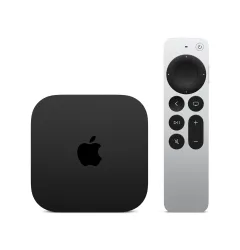
I picked up the Apple TV 4K (3rd generation) primarily because I needed a reliable Thread border router for my Home Assistant setup. The fact that it's also the best streaming device I've ever used was a welcome bonus. At $149 for the 128GB model with Ethernet and Thread support, it's pulling double duty in my living room -- premium media hub and critical smart home infrastructure in one box.
After several months of daily use for both streaming and Thread networking, it excels at the first job and handles the second capably, with one small but persistent caveat that I'll get to. If you're in the Apple ecosystem and building out a Thread-based smart home, this is the one device that genuinely justifies its "hub" designation.
Design & Build
Apple shrunk the Apple TV significantly with this generation -- roughly half the weight and noticeably smaller than its predecessor. Mine sits behind my TV on a small shelf, and I forget it's there for weeks. No ventilation slots, no fans, just silent operation.
The new Siri Remote deserves real praise. Apple finally figured out what people want after years of infamously frustrating remote designs. The clickpad with the outer touch ring for scrubbing video is intuitive, volume and power buttons control your TV via IR, and USB-C charging means the battery lasts months. My wife picked it up day one and figured it out immediately -- the real usability test.
Build quality is typical Apple: machined aluminum, premium feel, built to outlast several software generations. The HDMI 2.1 port supports 4K at 120fps, and the Gigabit Ethernet port on the 128GB model is essential for both stable streaming and reliable Thread border router duty. The design philosophy is "disappear and perform," and it succeeds completely.
Features
The A15 Bionic chip is overkill for a streaming box, but the result is an interface that feels impossibly smooth. Apps launch instantly, navigation is lag-free, and I've never seen a stutter. Coming from a Roku, the responsiveness difference made my old device feel sluggish.
Streaming quality is excellent. Dolby Vision and HDR10+ support means HDR content looks stunning regardless of format. Automatic frame rate matching switches seamlessly between 24fps cinema and 60fps sports. Colors are vivid, blacks are deep, motion is smooth.
AirPlay is a major differentiator for Apple households. I throw photos, videos, and screen mirrors from my iPhone and MacBook constantly. It works instantly and reliably, with quality indistinguishable from native playback.
The Thread border router is why I specifically bought the 128GB Ethernet model -- the cheaper 64GB variant does not include Thread. The border router creates a mesh network that devices like my Aqara T2 bulbs connect to, bridging Thread traffic to my IP network and ultimately to Home Assistant. Combined with my HomePod Mini as an additional border router, I've got redundant Thread infrastructure.
Performance
As a streaming device, performance is genuinely flawless. Zero complaints after months of daily use. 4K content loads in seconds, no buffering issues, and picture quality is the best I've seen from any consumer streaming box. The A15 handles everything effortlessly.
As a Thread border router, performance is mostly excellent with one caveat. My Thread devices -- a dozen Aqara T2 bulbs, sensors, and other accessories -- connect reliably, commands execute quickly, and the mesh stays stable for weeks. I run it on wired Ethernet, which I'd strongly recommend for any border router.
Here's the asterisk: every few weeks, I need to restart the Apple TV to clear up Thread flakiness. Devices become slow to respond, automations lag, and the mesh feels "sticky." A restart fixes it within minutes, but for always-on infrastructure, this periodic maintenance is annoying. I've seen similar reports in Home Assistant forums, so it's not just me. Not a dealbreaker -- we're talking two minutes every three to four weeks -- but it should be more set-and-forget.
Apple's Thread implementation uses version 1.2, while some newer devices support Thread 1.3+. No compatibility issues so far, but worth knowing as the ecosystem evolves.
Ease of Use
Setup is vintage Apple: hold your iPhone near the Apple TV, tap a few prompts, and it transfers your Apple ID, WiFi, and settings automatically. Five minutes total, including the initial software update. No passwords, no fiddling.
The tvOS interface is clean and intuitive. My wife uses it daily without help. Siri search works well across streaming services, and settings are logically organized. Compared to the cluttered, ad-heavy interfaces on Roku and Fire TV, tvOS feels premium.
For Thread/HomeKit hub functionality, there's nothing to configure. Once connected via Ethernet, it registers as a home hub automatically. Thread border router activates without intervention. You can verify status in the Home app, but there's no ongoing maintenance needed -- aside from those restarts.
One tip: if you have multiple Apple home hub devices (HomePod Minis, iPads, other Apple TVs), ensure the Ethernet-connected Apple TV is set as your primary hub. The Home app sometimes assigns priority arbitrarily, and you want your wired device handling Thread traffic.
Value
At $149 for the 128GB Ethernet model, the Apple TV 4K is reasonable by Apple standards. You're getting a premium streaming device and Thread border router in one box. Buying those separately -- a quality streamer ($50-100) plus a dedicated border router ($30-50) -- costs comparably while cluttering your setup.
The 64GB WiFi-only model at $129 saves $20 but loses Ethernet and Thread. I'd strongly advise against this false economy. That $20 buys meaningful long-term value as Matter/Thread devices proliferate.
If you're not in the Apple ecosystem, the value proposition weakens. AirPlay and tight iPhone integration lose their appeal for Android households -- a Chromecast or Shield TV would serve better. The Apple TV shines when paired with iPhone, HomePod Mini, and Apple Home or Home Assistant.
Compared to the Home Assistant Green ($99), the Apple TV serves a different primary function. The ideal setup is both: Green as your automation brain, Apple TV as streaming and Thread infrastructure. They complement each other perfectly.
Pros
- Best-in-class streaming quality with Dolby Vision and HDR10+
- Incredibly smooth interface powered by A15 chip
- Built-in Thread border router (128GB model)
- Excellent AirPlay integration with Apple devices
- Premium build quality and improved Siri Remote
Cons
- Thread border router occasionally needs restart
- Only the 128GB Ethernet model has Thread support
- Limited value if you're not in Apple ecosystem
- No native YouTube 4K HDR (Apple/Google dispute)
Final Grade
The Apple TV 4K (3rd generation) does exactly what I bought it for: streaming content beautifully and providing reliable Thread infrastructure. As a streamer, it's the best I've used -- fast, responsive, picture-perfect. As Thread infrastructure, it works about 95% of the time, with occasional restarts needed every few weeks.
If you're building a Thread-based smart home in the Apple ecosystem, the 128GB Ethernet model is a straightforward recommendation. Plug it into Ethernet, set it as your primary hub, and accept the occasional restart. For $149, you get premium streaming and smart home infrastructure in one compact, silent box.