Water damage is one of those things you don't think about until it happens. After a neighbor's dishwasher flooded and damaged multiple apartments below -- resulting in tens of thousands of dollars in insurance claims and months of repairs -- I decided to invest in leak sensors. The Aqara Water Leak Sensors have been quietly monitoring my apartment for four months now, placed under every water source I could think of. Thankfully, there's been no major emergency, but the one small incident I did have proved these little pucks are worth every penny.
At roughly $20 each, the Aqara sensor sits in an uncrowded sweet spot: it's inexpensive enough to scatter throughout your home, reliable enough that you can trust it with serious flood prevention, and smart enough to integrate with the automation systems that actually make leak detection useful. If a pipe bursts at 2 AM while you're sleeping, the difference between catching it in 30 seconds versus 6 hours could be the difference between mopping up a puddle and gutting your floors.
Design & Build
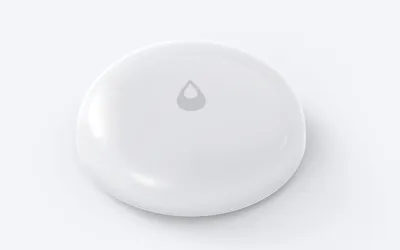
These are tiny white pucks, roughly the size of a half-dollar coin and just 8mm tall. That low profile is a serious advantage -- I have sensors tucked under my dishwasher, washing machine, bathroom sink vanity, and water heater closet, and none of them interfere with anything. The sensor slides into gaps that would be too tight for bulkier competitors like the SmartThings Water Leak Sensor, which is nearly twice the height.
Build quality is excellent for the price. The two metal contact points on the bottom are robust and slightly raised, ensuring they make good contact with any pooling water on a flat surface. The entire unit carries an IPX8 water-resistance rating, which makes sense given its purpose -- if your leak sensor dies the moment it touches water, you have a problem. The white plastic body is clean and unobtrusive, though I do wish it came in additional colors for darker surfaces.
Power comes from a CR2032 coin cell battery, the same kind you'll find in most watches. Aqara claims a 2-year battery life under normal conditions, and after four months all four of my sensors still report 100% in the app. That tracks with my experience with other Aqara Zigbee devices -- they sip power. The battery compartment pops open easily with a fingernail, so replacement should be painless when the time comes. There's also a small hole on the sensor body for threading a lanyard, which could be useful if you need to hang it near an elevated pipe rather than laying it flat on the floor.
Features
The sensor does one thing -- detect water -- and it does that one thing exceptionally well. When the two metal contact points on the bottom come into contact with water, it fires off an alert through your Zigbee network. There's no ambiguity, no complex configuration, and no false positives from humidity or condensation. It either sees water or it doesn't.
What surprised me is the built-in temperature sensor, which turned out to be more useful than I expected. I use the temperature reading from the sensor in my water heater closet to keep tabs on conditions there. If the closet gets abnormally warm, it could indicate the water heater is overworking or malfunctioning. In winter, if the temperature drops too low near pipes, I'd get a heads-up before anything freezes. It's not laboratory-grade precision, but it's close enough for these kinds of monitoring tasks.
One important caveat: the Aqara Water Leak Sensor requires either an Aqara hub or a compatible Zigbee coordinator to function. I run mine through Home Assistant with a SONOFF Zigbee 3.0 USB dongle, and they paired instantly. If you use an Aqara hub, you also get native Apple HomeKit support, which is a nice bonus. The sensor does not work over WiFi or Bluetooth on its own -- it's Zigbee only. For anyone already running a Zigbee mesh, that's a strength. For someone with no Zigbee infrastructure, it means an additional investment of $30-50 for a coordinator or hub.
The sensor also lacks a built-in siren or audible alarm, which means you're fully dependent on your smart home system to notify you. I've set up automations in Home Assistant to flash my lights red and send push notifications to both my phone and my wife's if any sensor triggers. You could also pair it with a smart siren for an audible alert, but that's an extra purchase and configuration step.
Performance
I've tested these sensors multiple times by placing a wet finger on the contact points, and the response is remarkably fast -- typically within one to two seconds. I've also done a more thorough test by setting the sensor on a plate and slowly adding water with an eyedropper. The moment the water bridges the two contact points, the alert fires. There's no warm-up period or sensitivity threshold to worry about. It either detects water or it doesn't, and the detection is near-instantaneous.
The one real-world test came about six weeks in, when I accidentally overfilled a pot while doing dishes and water splashed across the counter and onto the floor near the dishwasher sensor. My phone buzzed within seconds with the alert. It was a false alarm in the sense that nothing was actually broken, but it was deeply reassuring to see the system work exactly as intended in a real scenario. I wiped up the water, the sensor cleared itself within a minute, and life went on.
Zigbee range has been excellent throughout my apartment, which is roughly 900 square feet. Even the sensor in the water heater closet -- behind a closed door and through a wall from the nearest Zigbee router device -- reports reliably every time. The sensors check in regularly with my coordinator, and in four months I have never had a single sensor drop offline or become unresponsive. That kind of reliability matters enormously for a safety device. If your leak sensor has flaky connectivity, it's essentially worthless.
Battery performance has been flawless so far. All four sensors remain at 100%, and given the low duty cycle of a Zigbee end device that only needs to wake up for periodic check-ins and leak events, the 2-year estimate from Aqara seems conservative if anything.
Ease of Use
Pairing with my Zigbee coordinator could not have been simpler. Hold the tiny button on the sensor for about 5 seconds until the LED blinks, then watch Home Assistant discover it automatically. The entire process took about 30 seconds per sensor. All the relevant entities -- water detection, temperature, and battery level -- appeared without any manual configuration. If you're using an Aqara hub instead, the process is similarly painless through the Aqara Home app.
Placement is straightforward and requires zero tools or installation. You simply set the sensor flat on the floor wherever water would pool if there were a leak. Under the dishwasher, next to the base of the toilet, beneath the washing machine hoses, near the water heater drain pan. I spent maybe 10 minutes walking around my apartment placing all four sensors, and I haven't had to touch them since. The flat design means they don't get kicked around or shift position.
There's essentially nothing to configure on the sensor itself. The intelligence lives in your hub or automation platform. I set up a simple Home Assistant automation: if any water leak sensor changes to "wet," send a critical notification to my phone, flash the living room lights red three times, and send a message to my wife's phone. That took about five minutes to write. The sensor side is truly set-and-forget -- you place it, pair it, and then ignore it until it has something to report. That's exactly how a safety device should work.
Value
At around $20 each -- and often less in multi-packs, where four sensors can run under $70 -- the Aqara Water Leak Sensor is absurdly cheap insurance. To put the cost in perspective: the average water damage insurance claim in the U.S. runs around $12,000. A single undetected slow leak under a sink can warp floors, grow mold inside walls, and lead to repair bills that dwarf the cost of the entire Aqara product line. For the price of a mediocre dinner out, you can monitor a water source for two-plus years.
The value equation becomes even more compelling when you consider what you're not paying for. There's no subscription. No monthly monitoring fee. No cloud dependency if you run them through Home Assistant or another local Zigbee setup. You buy the sensor once, drop in a $3 battery every couple of years, and that's it. Compare that to services like Flo by Moen, which charges $5/month for premium leak monitoring, and the Aqara approach saves money from day one.
The only caveat is the Zigbee hub requirement. If you're starting from zero, you'll need a coordinator (around $30 for a SONOFF dongle, or $50-60 for an Aqara hub). But that's a one-time investment that supports dozens of Zigbee devices. If you already have a Zigbee setup, these sensors are essentially an impulse buy that could save you from financial catastrophe. I genuinely cannot think of a better value proposition in the smart home space.
Pros
- Excellent value at around $20 each
- Compact design fits anywhere
- Fast response time
- Long battery life
- Includes temperature sensing
- No subscriptions or cloud dependency
Cons
- Requires Aqara hub or Zigbee coordinator
- No built-in siren or alarm
- Limited to detecting water on floor level
Final Grade
The Aqara Water Leak Sensor is exactly what a smart home sensor should be: affordable, reliable, and completely invisible until the moment it matters. It does one job, does it immediately, and then gets out of the way. After four months of deployment under every water source in my apartment, I have total confidence that if a pipe bursts or an appliance leaks, I'll know about it within seconds -- long before the damage becomes catastrophic.
At this price point, there is genuinely no reason not to have these under every water source in your home. A four-pack costs less than a single plumber's house call, and the peace of mind is priceless. If you're running Home Assistant or any Zigbee-compatible hub, buy a handful of these today. It's the kind of boring, essential, unsexy smart home device that could save you from a five-figure disaster. That's an A in my book.