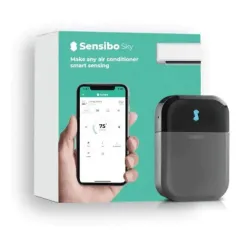
My apartment came with a Mitsubishi mini-split AC unit that predates the smartphone era by a good decade. It works well -- efficient, quiet, heats and cools effectively -- but the only way to control it is with the original infrared remote, which means physically walking over and pressing buttons like it's 2005. The Sensibo Sky promised to fix that by turning my dumb AC into a smart, automated, remotely-controllable appliance.
After three months of use, the Sensibo has delivered on that promise. Remote control works, the automation features save real energy, and my AC finally feels like it belongs in a modern smart home. But there's a significant caveat that colors everything: this device is 100% dependent on Sensibo's cloud servers. If their company has a bad day, or a bad year, or goes out of business entirely, your $100 device becomes a paperweight. That cloud dependency is the central tension of this review.
Design & Build
The Sensibo Sky is a compact white pod -- roughly 3.2 by 2.2 by 0.8 inches -- that mounts on the wall near your AC unit. It needs line-of-sight to the AC's infrared receiver, exactly like a remote control, so placement is constrained by where your AC's IR sensor is located. In my case, it's mounted about two feet to the right of the mini-split at roughly the same height, angled slightly toward the unit.
The design is inoffensive without being particularly attractive. It's a small white plastic rectangle that blends into a white wall and largely disappears once you stop thinking about it. Build quality is acceptable -- the plastic housing does the job without feeling premium or cheap. The included 3M mounting tape held firmly to my painted drywall from day one.
Power comes via a micro USB cable (not USB-C, which feels dated for a product still actively sold), which means running a cable from the Sensibo to an outlet. In my setup, I tucked the cable along the wall molding and it's barely noticeable. But depending on your outlet placement and wall layout, the cable management could be anywhere from trivial to annoying. A battery-powered option or USB-C would be welcome in future versions.
Features
The Sensibo works by learning your AC's infrared remote control signals and recreating them. During setup, you select your AC brand and model from a database of thousands of units, and the Sensibo maps all the available functions -- temperature, mode (cool, heat, fan, dry, auto), fan speed, and swing direction. My Mitsubishi mini-split was recognized immediately, and every single function mapped correctly on the first try. The command database is impressively comprehensive.
Climate React is the standout feature and the reason the Sensibo earns its keep. You set target temperature and humidity ranges, and the Sensibo automatically turns your AC on or off to maintain those conditions. My setup: turn on cooling when the room hits 78 degrees, turn off when it reaches 74 degrees. In practice, this means the AC cycles efficiently throughout the day instead of running continuously or being manually toggled. I've seen a noticeable reduction in my electricity bill since installing it -- roughly 15-20% on cooling costs, which in a New York summer adds up fast.
Geofencing works reliably through the Sensibo app. When my wife and I both leave the apartment, the AC turns off automatically. When either of us is heading home, it kicks on so the apartment is comfortable when we arrive. This alone would justify the device's cost over a summer or two.
Integration support includes Google Home, Amazon Alexa, Apple HomeKit (via Siri Shortcuts, not native -- you need the pricier Sensibo Air for native HomeKit), Samsung SmartThings, and Home Assistant. I control mine primarily through Home Assistant, which provides full access to all functions including Climate React configuration.
Performance
IR control has an inherent limitation that's worth understanding: the Sensibo sends commands but has no way to confirm the AC actually received them. Unlike a smart thermostat connected to HVAC wiring, the Sensibo is essentially a remote control pointing at your AC and hoping for the best. In practice, with proper placement and line-of-sight, this rarely causes issues. In three months, I've had maybe two instances where a command didn't register, likely because something briefly blocked the IR path. A retry always works.
Climate React performs well once dialed in. There's a slight inherent delay -- the built-in temperature sensor needs to register the room hitting your threshold before it sends the command, and the AC then needs time to affect the room temperature. In practice, this means the room might overshoot your target by a degree or two before the system catches up. It's not a precision thermostat; it's a smart remote with temperature awareness. Setting your thresholds with a few degrees of buffer accounts for this easily.
The built-in temperature and humidity sensor is reasonably accurate. I compared its readings against a standalone Aqara temperature sensor in the same room, and they agreed within about 1 degree Fahrenheit and 3-4% humidity -- close enough for climate automation purposes.
Now, the elephant in the room: cloud dependency. Every command from your phone to the Sensibo to your AC routes through Sensibo's servers. If your internet goes out, remote control stops working. If Sensibo's servers go down (which has happened -- check their status page history), everything stops. If Sensibo goes out of business, your $100 device loses all smart functionality permanently. The AC itself still works with its original remote, but you've paid for nothing. This is a real risk, not a theoretical one, and it's the single biggest weakness of the product. There is no local control fallback for the smart features.
Ease of Use
Setup was genuinely easy -- one of the smoothest onboarding experiences I've had with a smart home device. Download the Sensibo app, plug in the device, connect it to your 2.4GHz WiFi network, and then select your AC brand and model from the database. The app walks you through a verification step where it sends a power-on command to your AC to confirm the IR codes are correct. My Mitsubishi mini-split was paired and fully functional within about three minutes. No tools, no technical knowledge, no frustration.
The Sensibo app itself is well-designed, with clear controls for all AC functions laid out in an interface that mirrors your AC's capabilities. Temperature adjustment is a large, easy-to-read dial. Mode, fan speed, and swing controls are clearly labeled buttons. Scheduling and Climate React configuration are straightforward, with enough options to be useful without being overwhelming. It's one of the better smart home companion apps I've used.
My wife picked up the app immediately and appreciates being able to adjust the AC from bed without finding the physical remote in a tangle of blankets. She also uses the geofencing feature unconsciously -- it just works in the background based on her phone's location. The Sensibo has been completely maintenance-free since installation. No firmware updates to apply manually, no reconnection issues, no settings that randomly reset. From a daily usability standpoint, it's excellent.
Value
The Sensibo Sky costs around $100, which is a significant premium for what is, at its core, a WiFi-connected infrared blaster. You can buy a Broadlink RM4 Mini for $25-30 that performs the same basic function -- sending IR commands to your AC -- and integrates with Home Assistant for local control without any cloud dependency. The Broadlink lacks Climate React, geofencing, and the polished app experience, but it gives you the same remote control capability at a quarter of the price.
The Sensibo's value proposition rests entirely on its software and automation features. Climate React, geofencing, the curated AC database, and the polished app are what you're paying the $70 premium for over a basic IR blaster. And those features do deliver real value -- the energy savings from geofencing and Climate React alone can recoup the cost within one or two cooling seasons, depending on your climate and electricity rates. I estimate the Sensibo saves me roughly $15-20 per month during summer, which means it pays for itself within six months.
But you're renting that functionality, not owning it. Every dollar of value the Sensibo creates depends on Sensibo's cloud infrastructure remaining operational and the company remaining in business. There's no local fallback, no open API that would let the community maintain it if the company folds. If you're comfortable with that trade-off -- and it's a reasonable one for a rental apartment where you can't install a proper smart thermostat -- the Sensibo Sky delivers genuine utility. If cloud dependency makes you uncomfortable, a Broadlink RM4 with Home Assistant gives you most of the functionality with full local control, at the cost of more setup effort and a less polished experience.
Pros
- Makes any IR-controlled AC unit smart
- Climate React automates temperature control
- Geofencing saves energy
- Easy setup with huge AC database
- Works with major smart home platforms
Cons
- 100% cloud-dependent (no local control)
- IR limitations (can't confirm AC received command)
- Premium price for an IR blaster
- If Sensibo goes away, so does your functionality
Final Grade
The Sensibo Sky solved a real problem in my apartment: making a decade-old mini-split AC remotely controllable and energy-efficient. Climate React and geofencing work as advertised and have measurably reduced my electricity bills. The app is polished, setup is painless, and the device has been maintenance-free for three months. For anyone with a dumb IR-controlled AC in a rental apartment, it fills a genuine need.
But I can't review this device without prominently flagging the complete cloud dependency. You're paying $100 for functionality that evaporates the moment Sensibo's servers go offline -- temporarily during outages, or permanently if the company shutters. For my use case, the energy savings and convenience outweigh that risk. For anyone with alternatives -- a home they own where they could install a proper smart thermostat, or the technical inclination to set up a Broadlink with Home Assistant -- those alternatives avoid the cloud dependency entirely and deserve serious consideration.