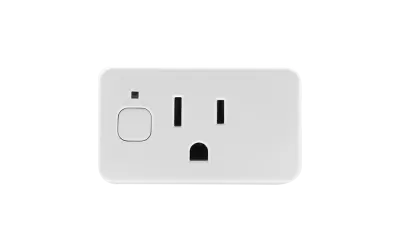
After watching three different cloud-dependent smart plugs fail me -- a Wemo that bricked itself during a firmware update, a TP-Link Kasa that stopped responding for six hours when their servers went down, and a no-name Tuya plug that required a Chinese cloud account to function -- I decided to try Shelly. The Shelly Plug US has been running continuously for six months in my home office, and it's fundamentally changed my expectations for what a smart plug should be. No cloud account required. No app required. A local web interface accessible from any browser on your network. Power monitoring included without a subscription. This is what happens when a company respects that you own the hardware you paid for.
Design & Build
Let's be honest: a smart plug is a small plastic box that goes between your wall outlet and your device. There's not a lot of design territory to explore. But within those constraints, the Shelly Plug US makes the choices that matter. It's compact enough that it doesn't block the second socket on a standard duplex outlet -- I can use both sockets simultaneously, which is not something I can say about the old Wemo Smart Plug that occupied my outlet like it was paying rent for both spots.
The form factor is a rounded rectangle in white plastic with a physical button on one side for manual on/off control and an LED indicator that shows power state. The LED can be configured or disabled through the web interface if you don't want a light glowing behind your desk. There's nothing visually remarkable about it, which is exactly right for a product that should disappear behind furniture. After six months of continuous use powering my home office equipment -- monitor, laptop dock, desk lamp -- the plug looks and functions identically to the day I installed it. No yellowing, no heat warping, no looseness in the outlet grip.
The 15-amp rating handles most household loads comfortably. I've had it running a space heater (drawing about 12 amps) without any warmth on the plug housing, which gives me confidence in the electrical design. The UL listing provides additional reassurance. Build quality, while not luxurious, is solid and functional -- exactly what a utility device should be.
Features
The Shelly Plug US's feature set starts with a principle that sets it apart from nearly every competitor: true local control with zero cloud dependency. Out of the box, the plug creates its own WiFi access point for initial configuration. Connect to it, set your home WiFi credentials, and you're done. From that point forward, you can control the plug entirely through its built-in web interface -- just type its IP address into any browser on your network. No app download, no account creation, no cloud server involved. If Shelly went bankrupt tomorrow and shut down every server, your plug would continue working exactly as it does today. Try saying that about a TP-Link Kasa or Wemo.
Power monitoring is built in and available without any subscription. The plug tracks real-time wattage, voltage, and cumulative energy consumption over time. I've used it to identify that my home office setup draws about 180 watts during normal use and spikes to 350 watts when my laser printer fires up. The energy tracking data helped me estimate that my office equipment costs roughly $22/month in electricity -- information that's just there, no premium tier required. Compare that to the TP-Link Kasa Smart Plug, where energy monitoring is either unavailable or limited to specific premium models.
Home Assistant integration is where the Shelly truly shines. The native local API means Home Assistant discovers Shelly devices automatically on your network and controls them with zero cloud latency. Commands execute in milliseconds. Status updates are instant. There's no polling delay, no cloud round-trip, no dependency on an external service. For Home Assistant users, Shelly devices are the gold standard for local integration. Beyond Home Assistant, the plug supports MQTT for advanced automation systems, CoAP for real-time status updates, and a REST API for custom integrations. This plug speaks more protocols than some smart home hubs.
The Shelly Cloud app and cloud service are available if you want remote access from outside your home network, but they're entirely optional. You can also set up remote access through a VPN to your home network, keeping everything local while still having control when you're away. Scheduling, timers, and automation rules can all be configured through the local web interface without any cloud involvement.
Performance
Performance is where the Shelly Plug US embarrasses its cloud-dependent competitors. Response time through Home Assistant is essentially instantaneous -- I've measured it at under 50 milliseconds from command to state change. When I tap the toggle in my Home Assistant dashboard, the desk lamp clicks on before my finger has lifted from the screen. Compare that to the 500-800 millisecond response times typical of cloud-based plugs, and the difference is visceral. It transforms smart home control from "send a command and wait" to "flip a light switch" responsiveness.
Power monitoring accuracy is excellent. I tested it against a dedicated Kill-A-Watt meter over a week-long period, and the Shelly's readings consistently matched within 2-3% -- close enough for household energy monitoring purposes. The voltage readings have also been accurate, hovering around 121-123V for my outlet, which matches my utility's nominal supply. The energy consumption tracking over time has been consistent and useful for understanding my office's power draw patterns.
Reliability is the headline here, and I want to be specific: six months of continuous, 24/7 operation with zero dropouts, zero unresponsive states, zero reboots needed, and zero firmware issues. The plug has been online continuously since the day I installed it. My Home Assistant uptime monitoring shows 100% availability. I've experienced exactly zero instances of the plug failing to respond to a command or showing an incorrect state. For context, my previous Wemo plug averaged one unresponsive episode per week that required power cycling. The Shelly has been literally perfect.
WiFi connectivity has been stable with no drops, even though the plug is about 30 feet from my access point through one wall. The plug reconnects automatically after router reboots and has never failed to rejoin the network. OTA firmware updates have been smooth -- I've applied two updates in six months, both completed in under a minute without disrupting the connected device.
Ease of Use
Setup is slightly more involved than a typical cloud plug, and I think that's worth discussing honestly. A TP-Link Kasa plug setup flow is: download app, create account, plug in device, follow prompts. Done in three minutes. The Shelly setup flow is: plug in device, connect your phone to the Shelly's WiFi access point, open a browser to 192.168.33.1, configure your home WiFi SSID and password, wait for the plug to connect to your network, then find its new IP address on your network. It takes about five minutes and requires a basic understanding of WiFi networks. For a technical user, this is trivial. For someone who's never connected to a WiFi access point manually, there's a small learning curve.
The Shelly app is available as an alternative to the web interface for initial setup and offers a more consumer-friendly experience. But the real power of the Shelly is in that local web interface, which exposes every setting: power monitoring thresholds, automation rules, scheduling, LED behavior, firmware management, MQTT configuration, and more. It's a dense interface that will feel familiar to anyone who's configured a router, but it could intimidate a non-technical user. Shelly clearly designs for the enthusiast market first and the consumer market second.
For Home Assistant users, the experience after initial setup is seamless. The Shelly integration auto-discovers devices on your network, adds them as entities, and exposes all controls and sensors. From that point, my wife never interacts with the Shelly directly -- she sees a lamp switch in our Home Assistant dashboard or it activates automatically based on time-of-day automations I've created. The technical setup is a one-time investment that disappears behind whatever friendly interface you put in front of it. Day-to-day, nobody in my house knows or cares that a Shelly plug is involved; they just know the office lamp turns on at 8 AM and off at 6 PM, and they can toggle it manually from the dashboard if they want to.
Value
At around $25, the Shelly Plug US offers one of the best value propositions in the smart plug market. But the real value isn't in the sticker price -- it's in what you're not paying for, now or ever. No subscription for power monitoring. No premium tier for advanced features. No account creation fee disguised as "free." No cloud dependency that could become a liability when (not if) the company changes its terms of service or shuts down a product line. You're buying a piece of hardware that works on open protocols and will continue working independently of any company's business decisions.
The competitive comparison is instructive. A TP-Link Kasa Smart Plug runs $15-20 and offers no power monitoring on the base model (the energy monitoring version costs $20-25 -- the same as the Shelly). A Wemo Smart Plug costs $25-30 and has a documented history of firmware bricking and cloud outages. An Meross Matter Smart Plug costs $15-18 but lacks power monitoring and has occasional reliability hiccups. The Shelly matches or beats all of them on price while offering dramatically more capability and independence.
Long-term value is where the Shelly really pulls ahead. Cloud-dependent plugs carry an implicit ongoing cost: the risk that a company discontinues cloud support, changes API access, or introduces subscription requirements. Google discontinued Works with Nest. Insteon went bankrupt and bricked thousands of devices. Wemo announced cloud shutdown before reversing course after backlash. The Shelly Plug US is immune to all of these scenarios because it doesn't need anything outside your local network to function. The $25 you spend today buys a device that should work for as long as WiFi exists, and that kind of longevity is rare in the smart home space.
Pros
- True local control - no cloud required
- Power monitoring included, no subscription
- Excellent Home Assistant integration
- Compact design doesn't block outlets
- MQTT, REST API, CoAP support
- Rock-solid reliability
Cons
- Setup slightly more technical than cloud plugs
- Web interface may intimidate non-technical users
- Not the most beautiful design (functional)
Final Grade
The Shelly Plug US is my default recommendation for smart plugs, and after six months of flawless operation, I've replaced every cloud-dependent plug in my house with Shellys. The combination of true local control, built-in power monitoring, excellent Home Assistant integration, and rock-solid reliability at a $25 price point makes everything else in the category look like a compromise. The setup is slightly more technical than plug-and-play cloud options, and the web interface assumes a certain comfort level with networking concepts. But that five-minute investment in setup buys you a device that works independently of any cloud service, responds to commands in milliseconds, tracks your energy usage for free, and has proven perfectly reliable over six months of continuous use. If you value owning your smart home rather than renting it from cloud services that could change terms or disappear tomorrow, the Shelly Plug US is the standard against which I measure every other smart plug.