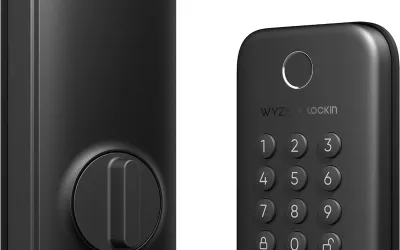
I was drawn to the Wyze Lock Bolt's sub-$100 price point when I needed a smart lock for my apartment. At a time when most respectable smart locks hover around $200-$300, Wyze's offering seemed like a steal. I'd had good experiences with other Wyze products -- their cameras and sensors punch well above their weight class -- so I figured the lock would follow suit. After four months of daily use on my front door, I understand exactly why this lock costs less than the competition. Reliability issues, misleading battery claims, and a half-baked keypad experience have made me question whether saving $100 upfront is actually saving money at all.
Design & Build
The Wyze Lock Bolt replaces your existing deadbolt entirely, which is a different approach from the original Wyze Lock adapter that sat on top of your existing hardware. The exterior keypad features a fingerprint reader and backlit number pad, while the interior has a chunky thumb turn. The exterior looks reasonably modern -- matte black finish, clean lines -- and it won't embarrass you when guests arrive. I'd say it looks better than many budget locks, though it can't match the refined aesthetics of something like the Yale Assure Lock 2.
Build quality is where I start hedging. The housing is plastic throughout, and while it's adequate, there's a noticeable creak when I grip the exterior keypad firmly. The fingerprint reader itself has a glossy finish that collects smudges quickly -- I'm wiping it down every few days to keep it responsive. The interior thumb turn feels hollow compared to the solid metal mechanisms on locks from Schlage or Kwikset. It works, but it doesn't inspire confidence that this is the device standing between your belongings and the outside world.
Installation was straightforward. The Bolt replaces your entire deadbolt, so you need a standard door prep (which most doors have). The included instructions are clear with step-by-step illustrations, and the whole process took me about 25 minutes. My door is 1-3/4" thick and the lock fit without any shimming or adjustment. It fits doors from 1-3/8" to 2" thick, which covers the vast majority of residential doors. For renters, just keep your original deadbolt so you can swap it back when you move out.
Features
The fingerprint reader is honestly the best part of this lock. Wyze claims a 98% recognition rate, and in my testing that tracks -- my thumb unlocks the door in under a second probably 19 out of 20 attempts. Wet fingers reduce accuracy noticeably, which is worth knowing if you live somewhere rainy. You can store up to 50 fingerprints, which is more than enough for a household. I have six registered across three family members and it handles switching between them without hesitation.
The backlit keypad supports up to 20 PIN codes, including temporary ones that expire automatically. This is useful for letting in a dog walker or house cleaner on a schedule. Setting up temporary codes through the Wyze app is simple enough, though the app needs to be within Bluetooth range of the lock to make changes -- there's no WiFi on this model. That's a critical limitation. Without WiFi, you can't grant someone a code while you're at work. You'd need the Wyze Lock Bolt v2 for remote access, which kind of defeats the budget argument.
The Bluetooth-only connectivity means no voice assistant integration, no remote lock/unlock, and no real-time notifications when you're away from home. The Wyze app works fine for managing fingerprints and PINs when you're standing at the door, but anything beyond local control is a dead end. There's auto-lock on a configurable timer, which works as expected -- I have mine set to 30 seconds. Home Assistant integration does exist through Wyze's cloud API, but it requires a separate Wyze gateway and is cloud-dependent. If Wyze's servers go down, so does your integration.
Performance
This is where the Wyze Lock Bolt falls apart, and I want to be specific because these aren't theoretical concerns -- they're problems I've experienced personally and that line up with widespread reports across Reddit and the Wyze forums.
The motor jamming issue is the most serious. Approximately once every two weeks, the bolt fails to fully extend or retract. The lock claims it's in a locked state, but the bolt is only partially engaged -- maybe halfway into the strike plate. This is a genuine security issue. A door that your app says is locked but isn't actually secure is worse than a dumb deadbolt that you can physically verify. I've started manually checking the bolt position before leaving the house, which defeats the entire purpose of a smart lock.
Calibration drift compounds the problem. The lock needs recalibration every few weeks because it loses its sense of where "fully locked" and "fully unlocked" positions are. The recalibration process itself takes about 30 seconds through the app, but the fact that it's necessary this frequently tells me the motor's positional feedback system isn't well-engineered. By comparison, I've never recalibrated my friend's Schlage Encode Plus in over a year.
Battery life has been a disappointment. Wyze quotes approximately one year from 4 AA batteries. I'm getting closer to 2-3 months with moderate use -- maybe 8-10 lock/unlock cycles per day. Cold weather seems to accelerate drain. I've already gone through two sets of batteries in four months. At roughly $1.50 per set of AAs that's not a bank-breaker, but the discrepancy from the claimed life is frustrating.
I've locked myself out once because the app showed "locked" when the door was actually unlocked. I left for work confident my apartment was secure, and came home to find the bolt fully retracted. Nothing was stolen, but the trust was gone. A smart lock that lies about its own state is a liability.
Ease of Use
Initial installation gets decent marks. The deadbolt replacement process is well-documented, the app walks you through calibration step by step, and the entire setup from unboxing to working lock took under 30 minutes. I didn't need any tools beyond a Phillips screwdriver. Pairing via Bluetooth was seamless -- the app found the lock immediately and firmware updated during initial setup without drama.
The Wyze app itself is well-designed for basic tasks. Adding fingerprints is quick -- press and hold the fingerprint sensor, follow the prompts, done in about 15 seconds per finger. Creating PIN codes is similarly straightforward. The lock activity history shows who unlocked the door and when, though it only syncs when your phone is in Bluetooth range. The interface is clean and modern, consistent with the rest of Wyze's app ecosystem.
Where usability falls apart is in ongoing maintenance. No smart lock should require the amount of babysitting this one demands. Recalibrating every few weeks, troubleshooting fingerprint reader accuracy when the sensor gets dirty, swapping batteries every couple months, occasionally removing and re-pairing the lock when it gets stuck in an unresponsive state -- it adds up. My wife went from using the fingerprint reader happily to just pulling out her keys after the third time she stood at the door waiting for it to respond. When someone abandons your smart lock for a physical key, that's a damning verdict on usability.
Value
The Wyze Lock Bolt sells for around $70-80, which looks like a bargain until you total up the real cost of ownership. This Bluetooth-only model doesn't support remote access, so if you want that, you're looking at upgrading to the Lock Bolt v2 or adding Wyze's gateway. Batteries need replacing every 2-3 months rather than the claimed year, which adds a small recurring cost and a lot of recurring annoyance.
Here's the comparison that matters: a Yale Assure Lock 2 runs around $180-220, includes WiFi, works with every major smart home platform, and has a track record of reliable operation. The Schlage Encode Plus at $250-300 gives you Apple Home Key, rock-solid reliability, and a brand with decades of lock-making expertise. Yes, you're spending $100-200 more upfront, but you're getting a lock you can actually trust with your home security.
The frustration tax is real. Every minute I spend recalibrating, every moment of doubt when I leave the house wondering if the lock actually engaged, every battery swap -- that's a cost the price tag doesn't show. Smart home products that don't work reliably aren't budget-friendly; they're false economies. I've already started shopping for a replacement, which means I'll end up spending more total than if I'd bought a quality lock from the start. For a first smart lock, I'd strongly suggest saving up for something in the $150-250 range from an established lock manufacturer.
Pros
- Low initial price point
- Works with existing deadbolt (renter-friendly)
- Decent app design
- Guest code functionality with keypad
Cons
- Frequent jamming and calibration issues
- Keypad loses connection regularly
- Requires separate gateway for remote access
- Poor battery life vs. claims
- Cloud-dependent with no local control option
- Security concerns from false lock status
Final Grade
The Wyze Lock Bolt proves that some products are cheap for a reason. The fingerprint reader is genuinely impressive -- fast, accurate, and easy to set up. But everything surrounding that one bright spot is marred by reliability issues that are frankly unacceptable for a security device. Motor jamming, calibration drift, misleading battery life claims, and a lock status display that can't be trusted add up to a product that creates more problems than it solves. I've experienced false lock states, my wife has abandoned the smart features entirely, and I'm actively shopping for a replacement after just four months. A smart lock needs to do one thing above all else: give you confidence that your door is secure. The Wyze Lock Bolt fails that fundamental test. Spend the extra money on a Yale Assure Lock 2 or Schlage Encode Plus -- your home security shouldn't be a budget experiment.