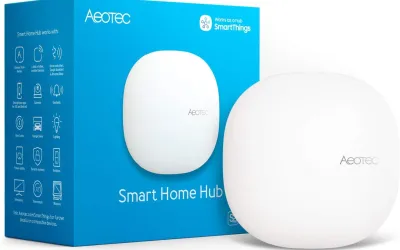
The SmartThings Hub v3 was supposed to be my straightforward entry into whole-home automation -- a single device that handles Zigbee, Z-Wave, and WiFi devices through one app with a polished interface. After eight months of use, I can report that it mostly delivers on that promise, with one critical caveat that colors every aspect of the experience: everything depends on Samsung's cloud servers. When those servers are healthy, SmartThings is a competent, user-friendly platform. When they're not, your entire smart home becomes an expensive collection of unresponsive devices.
The smart home hub market has evolved significantly since Samsung launched the Hub v3. Home Assistant has matured into a powerful local-first platform, Hubitat offers Z-Wave and Zigbee with local processing, and Apple Home with Thread devices provides a polished walled-garden experience. SmartThings occupies an increasingly awkward position: more capable than Apple Home but less reliable than Home Assistant, easier to use than Hubitat but more cloud-dependent than any of them. Understanding where SmartThings fits -- and where it doesn't -- is the key question for anyone considering this hub in 2026.
Design & Build
The Hub v3 is a compact white square about the size of a small WiFi router, with a minimal design that won't draw attention on a shelf or behind a television. The top surface is smooth white plastic with a subtle Samsung logo, and a single LED ring on the front indicates connection status (green for connected, various colors for different states). It's unobtrusive, which is exactly right for a device that sits in one place and is forgotten about.
Inside, the hub packs Zigbee 3.0 and Z-Wave Plus radios alongside WiFi and Bluetooth connectivity, giving it broad protocol support from a single device. An Ethernet port on the back provides a wired network connection, which I'd strongly recommend over WiFi for a hub that's the central nervous system of your smart home. Wired connections eliminate one variable from the reliability equation, and the hub's placement near a router is typical anyway. A USB port is also present, though its functionality has been limited in practice.
Build quality is adequate -- the plastic shell feels lightweight and budget compared to something like the Hubitat Elevation, but it's fine for a device that sits on a shelf and never gets handled after initial placement. The power adapter is a standard barrel connector with a short cable, and there's no battery backup -- a power outage takes the hub fully offline. For a cloud-dependent hub, this matters less than it would for a local-processing hub (the cloud dependency means internet outages disable it anyway), but a small UPS is still worth considering if you have automations that handle power-loss scenarios like lighting fail-safes or lock states.
Features
SmartThings supports a genuinely broad device ecosystem. Zigbee 3.0 and Z-Wave Plus cover the majority of dedicated smart home sensors, switches, locks, and plugs. WiFi integration adds cloud-connected devices like smart speakers, robot vacuums, and appliances. Samsung's own SmartThings-compatible devices (TVs, appliances, and the Galaxy ecosystem) integrate tightly. And Matter support, added through firmware updates, brings the newest cross-platform standard into the mix. The device compatibility list is one of the broadest in the industry.
The SmartThings app provides a unified control interface for all connected devices regardless of protocol. Scenes group multiple device actions ("Good Night" turns off all lights, locks the door, sets the thermostat, and arms the motion sensors). Automations trigger actions based on time, device state, location, or member presence. The automation editor is visual and approachable -- significantly easier to use than Home Assistant's YAML or Node-RED for basic if-then scenarios.
Voice assistant support covers Alexa, Google Assistant, and Samsung's Bixby. SmartThings also serves as a bridge that exposes connected devices to voice platforms, which means a Z-Wave light switch paired to SmartThings automatically becomes available in Alexa or Google Home without separate integration. This bridge functionality is genuinely useful and something local-first hubs like Hubitat also provide but with more setup friction.
Here's my fundamental problem with SmartThings: every feature I just described runs through Samsung's cloud infrastructure. Automations don't execute locally -- they travel from the hub to Samsung's servers, get processed, and the response returns to trigger the action. Device commands from the app route through the cloud. Even devices that are physically connected via Zigbee or Z-Wave on your local network are controlled through cloud round-trips. Samsung has been talking about expanding local processing for years, and some basic automations do run locally now, but the vast majority of SmartThings functionality stops working when your internet connection drops or Samsung's servers have issues. For a device marketed as your home's control center, that's a significant architectural weakness.
Performance
Under normal conditions with a healthy internet connection and functioning Samsung servers, SmartThings performs adequately. Command response times typically range from one to three seconds for device control through the app or automations -- noticeably slower than local-processing hubs like Home Assistant (sub-second) or Hubitat (under a second), but fast enough to be usable. Lights turn on when you flip a virtual switch. Automations trigger when their conditions are met. Scenes activate without drama. It works.
The performance problems emerge when cloud dependency becomes cloud vulnerability. Over eight months of use, I experienced four Samsung cloud outages that affected SmartThings functionality. Two were brief (under an hour), one lasted about three hours, and one was a rolling degradation that caused intermittent failures over a full day. During these outages, the impact varied from sluggish responses to complete inability to control any devices. My Zigbee light switches -- physically connected to the hub sitting three feet from me -- were unreachable because the command had to route through Samsung's unresponsive servers. This is the fundamental absurdity of SmartThings' architecture: local devices requiring cloud connectivity.
Automation reliability outside of outages is good but not perfect. Over eight months, I estimate about 95% of my automations triggered correctly -- arrival-based routines, time-based schedules, and sensor-triggered actions all work reliably most of the time. The remaining 5% failures had no obvious pattern or explanation: automations that simply didn't fire, or fired with significant delay. When you're depending on automations for things like locking doors or arming security sensors, 95% reliability isn't quite enough. By comparison, my Home Assistant automations on a separate test setup run at effectively 100% local reliability.
Device pairing is generally smooth for Zigbee and Z-Wave devices. The SmartThings app discovers new devices quickly, and the Zigbee/Z-Wave mesh networks have been stable with about 25 total devices. WiFi device integration depends on the manufacturer's cloud-to-cloud connection quality, which varies significantly. Some WiFi devices (Samsung appliances, certain TP-Link devices) integrate seamlessly; others have persistent connection issues that reflect their manufacturer's cloud reliability rather than SmartThings itself.
Ease of Use
Initial setup is one of SmartThings' genuine strengths. Plug the hub into power and Ethernet, download the SmartThings app, create a Samsung account (or use an existing one), and the app discovers the hub within seconds. The onboarding flow walks you through connecting your first devices and creating basic automations. From unboxing to a working smart home hub with a few devices connected took me about 20 minutes. This is significantly faster and friendlier than setting up Home Assistant (hours to days for a comparable setup) or Hubitat (faster than HA but less guided than SmartThings).
Device pairing through the app is mostly straightforward. Put the device in pairing mode, tap "Add Device" in SmartThings, and the hub usually discovers it within 30 seconds. The app provides a searchable device catalog that identifies specific products and loads the correct device handler automatically. When it works, it's seamless. Occasionally, devices require manual selection from the catalog or the generic Zigbee/Z-Wave handler, which is less intuitive but still manageable.
The SmartThings app has been through multiple major redesigns, and each one has been controversial in the community. The current version (as of early 2026) is the most stable and functional iteration, but there are still UI inconsistencies -- some settings are buried in unexpected locations, and the automation builder occasionally loses unsaved changes when navigating away. Samsung's pattern of redesigning the app interface every 12-18 months means the learning curve resets periodically, which frustrates long-term users. My wife has learned the current interface well enough for basic device control and scene activation, but she avoids the automation builder entirely.
For less technical users, SmartThings offers a significantly gentler learning curve than Home Assistant. If your automation needs are simple (scenes, schedules, basic if-then triggers), the visual builder is intuitive and doesn't require any programming knowledge. When needs become more complex, SmartThings' limits become apparent -- there's no equivalent to Home Assistant's scripting flexibility, and the community-developed "SmartApps" ecosystem has diminished since Samsung's platform transitions.
Value
The SmartThings Hub v3 originally retailed for $70-130 (pricing varied over its lifespan), and can now be found for $60-100. Samsung has transitioned to partnering with Aeotec for current SmartThings hubs (the Aeotec SmartThings Hub runs about $130-150), so the Hub v3 represents the last Samsung-branded model. Existing Hub v3 units continue to receive software updates and support, but the long-term trajectory clearly points toward Aeotec-branded hardware.
The raw hardware value is reasonable. A hub with Zigbee 3.0, Z-Wave Plus, WiFi, and Matter support for under $100 undercuts most competitors. Home Assistant Yellow is $130+, Hubitat Elevation is $150, and Apple HomePod (which serves as a Home hub) starts at $99 but only handles WiFi, Thread, and Matter (no Zigbee or Z-Wave). On protocol support per dollar, SmartThings is competitive.
But the real cost of SmartThings isn't the hub -- it's the platform dependency. Every device you connect, every automation you build, and every scene you create exists on Samsung's platform. If Samsung deprioritizes or sunsets SmartThings -- and they have a documented history of discontinuing smart home products (SmartThings Link, SmartThings WiFi, ADT SmartThings) -- your investment in configuration, automation logic, and ecosystem knowledge goes with it. This is the hidden cost of cloud-dependent platforms that doesn't show up on a receipt.
Home Assistant, by contrast, runs locally on hardware you own, with an open-source platform that can't be discontinued by any company's business decision. The setup is harder and the learning curve is steeper, but your investment in automations and configuration is yours permanently. For anyone planning to build a serious, long-term smart home, that permanence has tangible value. SmartThings is easier to start but riskier to invest in deeply.
Pros
- Supports Zigbee, Z-Wave, and WiFi
- Compact design
- Works with major voice assistants
- Broad device compatibility
- Easy initial setup
Cons
- 100% cloud-dependent
- Samsung's history of killing products
- Server outages affect all functionality
- Automations sometimes fail randomly
- No local processing option
- Platform future uncertain
Final Grade
The SmartThings Hub v3 is a capable multi-protocol hub that offers the easiest onboarding experience in the smart home hub market. The broad device support, visual automation builder, and polished app make it genuinely approachable for beginners and casual smart home users. If your needs are modest -- a few automated lights, some presence-based routines, voice control through Alexa or Google -- SmartThings handles it competently and with minimal technical friction.
The cloud dependency is the dealbreaker for serious smart home investment. When Samsung's servers go down, your local Zigbee and Z-Wave devices become unreachable. Automations occasionally fail without explanation. And Samsung's history of discontinuing smart home products creates legitimate long-term platform risk. For a few devices and simple routines, SmartThings is fine. For a deeply automated home where reliability matters, Home Assistant or Hubitat provide local processing, permanent ownership of your configuration, and independence from any single company's business decisions. The SmartThings Hub v3 is a competent starting point, but I'd encourage anyone getting serious about home automation to plan their eventual migration to a local-first platform.