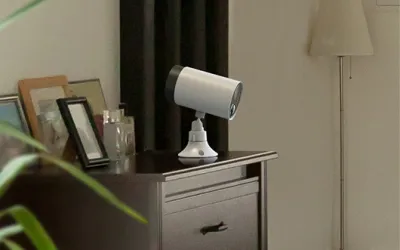
The TP-Link Tapo C420S2 takes aim at Arlo, Ring, and Eufy with a simple proposition: two 2K wire-free cameras and a hub with local storage for $149.99 — roughly what you'd pay for a single Arlo Pro 5 camera without a hub. It sounds too good to be true, and while there are legitimate compromises at this price, the Tapo C420S2 delivers a surveillance experience that will satisfy most homeowners who don't need bleeding-edge image quality or advanced AI features.
After running both cameras outdoors for nearly three months — one covering my driveway and one watching my back patio — the Tapo system has earned its place as my top recommendation for anyone entering the home security camera market on a budget. The battery life is genuinely impressive, local storage means no mandatory subscriptions, and ONVIF support opens doors that competitors at twice the price keep firmly shut.
Design & Build
The Tapo C420 cameras are compact white cylinders — roughly the size of a large energy drink can — with a flat face housing the lens and sensors. The design is clean but unremarkable, blending in well when mounted under eaves or on walls. Each camera weighs about 6 ounces, making them light enough for magnetic mounts to work reliably. The IP65 weather resistance rating has held up through rain, snow, and freezing temperatures without issues during my testing period.
The included Tapo Hub H200 is a small white puck that sits on a shelf or mounts on a wall. It houses the microSD card slot (supporting up to 512GB) and doubles as a chime and siren. Build quality on both the cameras and hub feels solid for the price — nothing premium, but nothing flimsy either. The plastic shells are thick enough to inspire confidence that they'll survive outdoor exposure for years.
The magnetic mounting system deserves praise. Each camera comes with a metal mounting plate that screws into any surface, and the camera attaches magnetically. This makes positioning adjustments dead simple and lets you pop cameras off for indoor charging. The 6700mAh battery charges via USB-C, which is a welcome modern touch.
Features
For $149.99, the feature list is remarkably complete. Each camera shoots 2K QHD video (2560x1440) with a 113-degree field of view. Starlight color night vision uses a larger sensor to capture usable color footage in low light without requiring a spotlight — though it does switch to IR in very dark conditions. Person, pet, and vehicle detection provide smart alerts that go beyond simple motion sensing.
The Tapo Hub H200 is the unsung hero of this system. It provides:
- Local storage via microSD card (up to 512GB, not included) — no subscription required for video recording
- Built-in siren that can be triggered manually or automatically on detection events
- Chime functionality that plays sounds when cameras detect motion
- Hub for future Tapo smart home devices including sensors and smart buttons
Two-way audio works well enough for telling delivery drivers where to leave packages. Alexa and Google Assistant integration enables live view on smart displays. And here's the feature that elevates this system above its price class: ONVIF support. This means the cameras work with third-party NVR systems, Home Assistant, Blue Iris, and other ONVIF-compatible platforms. For smart home enthusiasts, this is massive — Arlo, Ring, and most competitors lock you into their ecosystem.
Cloud storage is optional at $2.99/month per camera, which unlocks cloud-based AI features and 30-day video history. But with local storage on the hub, most users won't need it.
Performance
Image quality is where you feel the price difference most. The 2K resolution looks good on paper, and footage is certainly sharp enough to identify faces and read license plates in good lighting. But compared side-by-side with my Arlo Pro 4, the Tapo produces softer images with less dynamic range. Colors are slightly washed out in bright sunlight, and shadow detail falls off faster. It's not bad video — it's perfectly usable for home security — but pixel-peepers will notice the gap.
The 113-degree field of view is noticeably narrower than the 160-degree views offered by Arlo and Ring. In my driveway setup, I had to mount the camera further back than expected to capture the full width. This won't be an issue for everyone, but it's worth factoring into your mounting plans.
Battery life is the Tapo's headline performance metric, and it delivers. TP-Link claims 180 days, and after three months my driveway camera (averaging 15-20 events per day) was at 42% — putting it on pace for roughly 5 months. The patio camera (fewer events) was at 61%. These are legitimately impressive numbers that mean you'll charge each camera twice a year at most.
Motion detection response time is my biggest performance complaint. There's a consistent 1-2 second delay between motion occurring and the camera waking from sleep to start recording. This means you often miss the first moment of an event — a person walking up your driveway might be several steps in before recording begins. Person detection accuracy is solid once the camera is awake, with very few false positives from passing cars or blowing trees after initial tuning.
Ease of Use
The Tapo app guides you through setup with a smooth, well-designed flow. Plug in the hub, connect it to WiFi, insert a microSD card, then add each camera by scanning its QR code. The cameras pair with the hub wirelessly, and the entire setup took me about 20 minutes for both cameras. No technical knowledge required — TP-Link has clearly invested in making the out-of-box experience painless.
Day-to-day use through the Tapo app is pleasant. The interface is clean and responsive, live view loads in about 3 seconds (faster than Arlo's typical 5-8 seconds), and scrubbing through recorded footage on the timeline is smooth. Activity zones let you define specific areas to monitor, reducing false alerts from street traffic or swaying trees. Notification settings offer granular control — you can choose which detection types (person, pet, vehicle, general motion) trigger alerts for each camera.
Where the app falls short is in advanced features. There's no web interface for viewing footage on a desktop. Sharing camera access with family members works but is clunky. The activity zone editor only supports rectangular zones (no custom polygon shapes). And if you want to do anything beyond basic monitoring — like setting up complex automation rules — you'll need to look at the ONVIF integration with a platform like Home Assistant. For most users, though, the Tapo app covers the essentials competently.
Value
The value proposition of the Tapo C420S2 is, frankly, absurd. Let me put it in context: $149.99 gets you two 2K cameras, a smart hub with local storage support, smart detection, and ONVIF compatibility. A comparable Arlo setup — two Arlo Essential cameras and the Arlo SmartHub — runs over $250, and you'll still need an Arlo Secure subscription ($7.99/mo) to access video history and AI features. Over two years, that Arlo setup costs $440+ versus $150 for the Tapo (plus ~$15 for a 128GB microSD card).
The local storage option is the key value differentiator. By recording to a microSD card on the hub, you get full video history without any monthly fee. The optional cloud subscription at $2.99/month per camera is there if you want cloud backup, but it's genuinely optional — not a requirement dressed up as an option like Arlo Secure or Ring Protect.
ONVIF support adds long-term value that's hard to quantify. If you later upgrade to a full NVR system or adopt Home Assistant, these cameras come along for the ride. You're not locked into TP-Link's ecosystem, which means your $150 investment has staying power beyond the Tapo app's feature set. For the price of a nice dinner for two, you get a genuinely capable home security camera system. That's remarkable.
Pros
- Outstanding value — two 2K cameras with a hub and local storage for $149.99
- Battery life of 5-6 months under real-world use means charging just twice a year
- ONVIF support enables integration with Home Assistant, NVR systems, and Blue Iris
- No subscription required — local storage on the hub provides full video history for free
- Person, pet, and vehicle detection work reliably with minimal false positives after tuning
Cons
- Image quality is noticeably softer with less dynamic range than Arlo or Ring cameras
- 113-degree field of view is narrower than the 150-160 degrees offered by most competitors
- 1-2 second wake-up delay on motion detection means the first moments of events are often missed
- No Apple HomeKit support limits integration for Apple-centric smart homes
Final Grade
The TP-Link Tapo C420S2 isn't perfect — the image quality trails premium brands, the field of view is narrower than competitors, and motion detection has a slight wake-up delay. But none of those shortcomings matter as much as what this system gets right: two capable 2K cameras with a hub and local storage for $149.99, exceptional battery life, reliable smart detection, and ONVIF support that keeps your options open.
This is the camera system I recommend to friends and family who ask about home security cameras. Not because it's the best — the Arlo Pro 5 and UniFi G5 produce better footage — but because it delivers 85% of the experience at 40% of the cost with no mandatory subscriptions. For first-time security camera buyers, renters who need wire-free installation, and budget-conscious homeowners who want solid surveillance without a monthly fee, the Tapo C420S2 is the clear value champion in 2024.