Design & Build
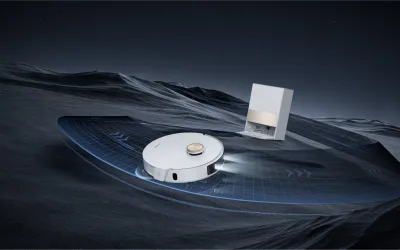
The L20 Ultra robot itself follows the now-standard circular design with a LiDAR turret on top. It's relatively low-profile at 3.8 inches tall (excluding the turret), which lets it fit under most furniture without issue. The white and silver color scheme looks clean and modern, though it shows scuffs and dust more readily than darker-colored competitors. The top cover lifts to reveal the dustbin, and the underside has a main brush roller, two side brushes, and two removable mop pads mounted on a lifting mechanism.
The base station is where design becomes a practical consideration. It's substantial -- about 18 x 16 x 17 inches -- and houses the auto-empty dustbin, clean water tank, dirty water tank, mop washing basin, and hot air drying system. It needs to sit against a wall with clear space in front for the robot to dock, and it requires a power outlet within cord reach. In my setup, it occupies about the same floor space as a kitchen trash can. If you have a tight laundry room or closet where you planned to hide it, measure carefully before purchasing.
The water tanks are easy to remove and refill. The clean water tank holds about 4.5 liters and the dirty water tank holds about 4 liters. In my two-story, ~2,400 sq ft home, I refill the clean water every 3-4 cleaning sessions and empty the dirty water at the same interval. The dustbin bag in the base station lasts about 4-6 weeks before needing replacement, and bags are reasonably priced at around $3-4 each.
The mop pad lifting mechanism is a standout design feature. When the robot detects carpet via its sensors, it lifts the mop pads 10.5mm off the ground -- higher than most competitors, which typically manage 5-7mm. This is enough clearance to avoid dampening most low-pile carpets and area rugs. It's not perfect with very thick, plush carpets (the pads can still brush the tops of longer fibers), but for typical household carpeting it works reliably. The mop pads themselves are dual rotating discs that press against the floor with consistent downward pressure.
Features
The Dreame app is the command center for the L20 Ultra, and it's one of the better robot vacuum apps available. The map view shows your floor plan with room labels, furniture detection, and real-time robot position during cleaning. You can set room-specific cleaning preferences -- vacuum only in the living room, vacuum and mop in the kitchen, skip the bathroom -- and save these as presets for different scenarios. No-go zones and virtual walls are easy to draw on the map, and the robot respects them reliably.
Multi-floor mapping is supported and works well. The L20 Ultra stores up to four separate floor maps, and it identifies which floor it's on automatically when placed on a different level (you do need to carry the robot to each floor since it can't climb stairs). Each floor has independent room settings, no-go zones, and cleaning schedules. The map editing tools let you merge or split rooms, rename them, and adjust boundaries if the automatic detection wasn't quite right.
Scheduling is flexible with support for daily schedules with different settings per day of the week. You can schedule different rooms on different days -- full house on Monday and Thursday, kitchen and dining room only on the other days. The app also supports do-not-disturb periods, custom suction levels per room, water flow rate adjustments for mopping, and cleaning order preferences. The level of customization is impressive and lets you fine-tune the cleaning routine to match your household's patterns.
Home Assistant compatibility is the feature that sets the L20 Ultra apart for smart home enthusiasts. Through the HACS Dreame Vacuum integration, you get full control and status monitoring in Home Assistant. You can trigger cleaning runs from automations -- start the robot when everyone leaves the house, clean the kitchen after dinner time, run a full house clean before guests arrive. The integration exposes battery level, cleaning status, error states, and consumable life remaining, which means you can build dashboards that show when mop pads need replacement or when the dustbin bag is full. This level of integration is rare among robot vacuums and adds genuine value for Home Assistant users.
Performance
Cleaning performance is exceptional and the primary reason to consider the L20 Ultra over cheaper alternatives. The 7,000Pa suction rating is among the highest in the consumer robot vacuum market, and it translates to tangible real-world results. On hard floors, the robot picks up fine dust, pet hair, crumbs, and small debris in a single pass with nearly 100% effectiveness. I tested it with a measured amount of baking soda on hardwood and it captured over 98% in one pass -- a result that matches or beats dedicated upright vacuums.
Carpet performance is equally impressive. The robot automatically increases suction to maximum when it transitions from hard floor to carpet, and the main brush roller does an excellent job of agitating carpet fibers to dislodge embedded dirt and pet hair. After a week of daily L20 Ultra cleaning, I ran my handheld Dyson over the same carpets and pulled up noticeably less debris than before the robot was doing daily runs. Deep pile performance isn't as strong -- the robot can struggle with very thick carpets -- but for typical residential carpet, it's thoroughly effective.
Mopping is where expectations need calibrating. The dual rotating mop pads do a solid job of daily maintenance mopping -- removing surface dust, light footprints, and minor spills. The consistent downward pressure and rotation pattern leave hard floors looking noticeably cleaner, and the hot water washing in the base station keeps the pads from becoming a source of contamination. However, the L20 Ultra will not remove dried, stuck-on stains. A coffee spill that's been on the floor for a day will get moistened and partially lifted but not fully removed. This is true of every robot mop I've tested -- for serious mop work, you still need human elbow grease or a dedicated mop.
Navigation is handled by a LiDAR sensor supplemented by a 3D structured light sensor and an RGB camera for obstacle detection. The mapping is fast and accurate -- the robot created a complete map of my first floor in a single initial run and correctly identified room boundaries about 90% of the time. Obstacle avoidance is where the L20 Ultra truly excels. It consistently identifies and navigates around shoes, chair legs, cable bundles, pet bowls, and toys. I deliberately left a charging cable and a pair of shoes on the floor during multiple runs, and the robot avoided them every time without getting stuck or tangled. This is a dramatic improvement over robot vacuums from even two years ago.
Ease of Use
Initial setup is straightforward but takes some time due to the base station configuration. Unbox the base station, fill the clean water tank, install the dustbin bag, attach the mop pads to the robot, and dock it. The Dreame app walks you through WiFi connection and initial mapping with clear step-by-step instructions. First run takes longer than subsequent runs as the robot maps your space, but the map is usable immediately after the first complete pass. Total setup time from unboxing to first real cleaning run is about 30-40 minutes.
Day-to-day operation requires minimal intervention. The robot empties its own dustbin after each run, washes its own mop pads with hot water, and dries them with warm air. You need to refill the clean water tank every 3-4 runs and empty the dirty water tank at the same interval. The app sends notifications when water tanks need attention and when consumables are running low. Dustbin bags need replacement every 4-6 weeks, and mop pads should be replaced every 2-3 months depending on usage.
The app interface is well-designed but has a learning curve for advanced features. Basic operation -- start, stop, schedule, clean specific rooms -- is intuitive. But configuring room-specific settings, adjusting obstacle avoidance sensitivity, setting up custom cleaning sequences, and fine-tuning mop water flow takes some exploration. The settings are logically organized but there are a lot of them, and Dreame doesn't always explain what each option does. A 15-minute session exploring the settings after initial setup is time well spent.
Maintenance is more involved than a vacuum-only robot but far less than manual floor cleaning. Beyond the water tank and dustbin bag changes, you should clean the main brush roller every 2-3 weeks (pet hair wraps around it), check the side brushes monthly, and wipe the LiDAR sensor and cameras every few weeks to ensure accurate navigation. The app tracks consumable life and sends replacement reminders, which is helpful for staying on top of maintenance without overthinking it. All the removable parts are tool-free and snap in and out easily.
Value
At approximately $1,200, the Dreame L20 Ultra is a significant investment in floor cleaning automation. The direct competitors are the Roborock S8 MaxV Ultra at a similar price and the Ecovacs Deebot X2 Omni at slightly less. All three offer comparable feature sets with differences in specific areas: Roborock has slightly better mopping with its VibraRise system, Ecovacs has a unique square shape for corner cleaning, and Dreame offers the highest suction power and the best Home Assistant integration.
The value proposition depends heavily on your home's size and floor complexity. In a 2,000+ sq ft home with mixed floor types, daily robot cleaning replaces a significant amount of manual labor -- roughly 3-4 hours per week of vacuuming and mopping. Over the robot's expected 3-4 year lifespan, that's 500-800 hours of cleaning time saved. If your time is worth even $15/hour, the L20 Ultra pays for itself in time savings alone within the first year. For smaller homes or apartments, the math is less compelling.
Ongoing costs are modest but worth noting. Replacement dustbin bags run about $3-4 each (needed every 4-6 weeks), replacement mop pads are about $15-20 for a set (every 2-3 months), and the main brush roller should be replaced annually at about $15-20. Budget roughly $80-100 per year in consumables. Electricity cost for daily cleaning and base station operation adds perhaps $3-5 per month to your power bill.
The L20 Ultra frequently goes on sale during major shopping events -- I've seen it as low as $899 during Black Friday and Amazon Prime Day sales. At that price, the value equation shifts considerably in its favor. If you're not in a rush, waiting for a sale and buying at $900-950 makes the L20 Ultra one of the best deals in premium robot vacuums. At full retail, it's a competitive option that justifies its price primarily for larger homes where the daily cleaning automation saves meaningful time and effort.
Pros
- 7,000Pa suction power handles pet hair, fine dust, and debris on both hard floors and carpet
- Auto mop lifting raises pads 10.5mm to avoid wetting carpets and area rugs
- Hot water mop washing at 131°F in the base station keeps mop pads genuinely clean
- Obstacle avoidance AI accurately identifies and navigates around shoes, cables, toys, and pet bowls
- LiDAR mapping creates accurate, multi-floor maps with room-specific cleaning settings
- Home Assistant integration via HACS allows full automation control and status monitoring
Cons
- Base station is large and requires significant floor space near a power outlet
- Mop performance on dried, stuck-on stains is mediocre -- it handles daily maintenance but not deep cleaning
- The $1,200 price tag is difficult to justify for smaller homes or apartments
- Fan noise at maximum suction is loud enough to disrupt conversation in the same room
- Mop pad drying cycle takes 2-3 hours and adds to the base station's already significant noise output