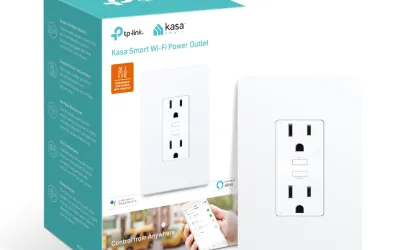
Smart plugs work, but they look terrible. A bulky adapter hanging off your wall outlet, blocking the second receptacle, with an LED blinking at you from across the room -- it's not exactly the seamless smart home aesthetic anyone aspires to. The TP-Link Kasa Smart In-Wall Outlet solves that problem by replacing your existing wall outlet entirely, putting smart control behind a standard-looking wall plate. After four months of daily use, I can confirm it does exactly what it promises: clean, built-in smart outlet control with independent switching and energy monitoring.
The trade-off for that clean installation is the WiFi/cloud architecture that's standard across the Kasa line. Commands route through TP-Link's servers, meaning smart features disappear during internet outages. If local control is your priority, Zigbee or Z-Wave in-wall outlets are better options. But if you want a smart outlet that doesn't look like one, the Kasa delivers on that specific value proposition better than any plug-in alternative.
Design & Build
The Kasa In-Wall Outlet's biggest selling point is also its simplest: once installed behind a standard Decora-style wall plate, it looks like a regular outlet. There's no bulky adapter protruding from the wall, no visible smart home hardware, and no blocked receptacles. The only visual cue that it's a smart outlet is a tiny LED indicator on the faceplate that glows amber when WiFi is connected, and even that's subtle enough to be invisible from across a room. For bedrooms, living rooms, or any space where aesthetics matter, this is a meaningful advantage over plug-in smart plugs.
The outlet features two standard tamper-resistant receptacles, each independently controllable through the Kasa app, plus two USB-A charging ports integrated below the AC outlets. The USB ports are always on (not smart-controlled), which is a minor limitation but perfectly fine for their intended purpose of providing convenient phone/tablet charging without occupying an AC receptacle. The combined AC capacity is 15 amps, standard for residential outlets, and each USB port delivers 5V/2.4A -- fast enough for phone charging but not USB-C fast-charging speeds.
Build quality is solid. TP-Link's heritage as a networking equipment manufacturer shows in the construction: the outlet mechanism feels robust, receptacle grip on plugs is firm (no loose connections), and the internal wiring terminals are clearly designed for professional-grade installations. The overall unit is deeper than a standard outlet -- about 2 inches from faceplate to back -- which can make installation tight in shallow junction boxes. I'll address that more in the ease of use section, but it's worth measuring your box depth before purchasing.
The included wall plate is a standard white Decora-style plate that matches common switches and outlets. If your home uses a different plate style or color, any standard Decora plate will fit. The overall appearance after installation is indistinguishable from a regular outlet to anyone who doesn't notice the LED indicator, which is exactly the goal.
Features
Both AC outlets are independently controllable through the Kasa Smart app, meaning you can turn one on or off without affecting the other. This is more useful than it might initially sound: I have a desk lamp on the top outlet (scheduled to turn on at sunset and off at 11 PM) and a phone charger on the bottom outlet (always on). You can create individual schedules, countdown timers, and scene configurations for each outlet separately, providing surprisingly granular control from a single wall device.
The Kasa app includes energy monitoring for each outlet, showing real-time wattage, daily/weekly/monthly consumption graphs, and estimated electricity costs based on your local rate. I've found this useful for identifying energy-hungry devices and verifying that schedules are actually working (you can see the wattage drop to zero when an outlet turns off). The accuracy is reasonable -- I cross-referenced with a Kill-A-Watt meter and the Kasa readings were within 5% of the dedicated monitor, which is close enough for household tracking.
Voice control works with Amazon Alexa and Google Assistant. Each outlet appears as a separate device in both platforms, so you can say "turn off the desk lamp" to control just one outlet. The integration is direct (no skills or actions to install), and commands execute within 1-2 seconds through the cloud pipeline. The notable absence is HomeKit support -- the entire Kasa line lacks Apple ecosystem integration, which is a dealbreaker for Apple-only households. TP-Link's Tapo line offers some HomeKit compatibility, but the in-wall outlet isn't available in that lineup.
The cloud dependency is the feature-level limitation that matters most. All smart functionality -- app control, scheduling, voice commands, energy monitoring -- routes through TP-Link's cloud servers. During an internet outage, the outlets still function as regular always-on outlets (you don't lose power to plugged-in devices), but smart control, scheduling, and energy monitoring stop working until internet is restored. For users who run Home Assistant, the Kasa integration has historically been cloud-based, though TP-Link has made moves toward local API access that may improve this over time. If guaranteed local control matters to you, Zigbee or Z-Wave in-wall outlets with a local hub are the better architectural choice.
An "Away Mode" feature randomizes the on/off pattern of connected devices to simulate occupancy when you're traveling -- a genuinely thoughtful security feature that works well for lamps connected to smart outlets. It's a small addition that I appreciate, even though I've only used it twice during trips.
Performance
Daily performance has been reliable over four months of continuous use. Commands through the Kasa app execute within 1-2 seconds -- not instantaneous, but fast enough that it doesn't feel frustratingly slow. Voice commands through Alexa add the voice processing overhead, totaling about 2-3 seconds from speech to outlet response. For controlling a lamp or a fan, this latency is acceptable. For anything time-sensitive (which is rare for a wall outlet), it would be noticeable.
WiFi connectivity has been rock-solid. The outlet connects on 2.4 GHz only, which provides better range and wall penetration than 5 GHz. Over four months, I haven't experienced a single disconnection or unresponsive episode. The outlet sits about 15 feet from my nearest mesh access point with one interior wall between them, and signal strength has been consistently strong. TP-Link knows WiFi networking, and that expertise translates to reliable wireless performance in their smart home devices.
Scheduling reliability has been perfect in my testing. The sunset/off schedule I configured for the desk lamp has executed correctly every single night. The Kasa app's scheduling uses astronomical data for sunrise/sunset times that automatically adjust as day length changes through the year, which is a nice detail that saves you from manually adjusting hardcoded times seasonally. Countdown timers (useful for things like "turn off the space heater in 2 hours") also work reliably.
During one internet outage that lasted about three hours, the smart features were unavailable as expected. The outlets continued providing power to plugged-in devices (they default to their last state), and schedules that were supposed to trigger during the outage did not execute. Once internet was restored, the outlets reconnected automatically and resumed normal smart operation without any intervention. This is the expected behavior for a cloud-dependent device, and while it's a limitation, TP-Link handles the reconnection gracefully.
Energy monitoring has been consistent and useful. I tracked my desk lamp's consumption over a month and confirmed it draws about 12 watts while on and 0.3 watts in standby -- data that's interesting for energy-conscious users and confirms the lamp isn't drawing phantom power when the smart outlet turns it off. The monitoring data persists in the app's history, giving you a clear picture of consumption patterns over time.
Ease of Use
Installation is the most significant barrier to entry, and it's not something to take lightly. This is not a plug-and-play device -- it requires removing your existing wall outlet and wiring the Kasa outlet in its place. That means turning off the circuit breaker, removing the wall plate and existing outlet, connecting line, neutral, and ground wires to the Kasa unit, carefully folding everything back into the junction box, mounting the outlet, and replacing the wall plate. If you've done basic electrical work before (replacing a light switch or outlet), this is comparable. If you haven't, I'd strongly recommend having an electrician do it or at minimum watching detailed instructional videos and understanding your local electrical code requirements.
The neutral wire requirement is important: the Kasa outlet needs a neutral wire (white) in addition to the hot (black) and ground (green/bare) wires. Most homes built after the 1980s have neutral wires in outlet boxes, but some older construction may not. Check your junction box before purchasing -- if you only see a hot wire and a ground, this outlet won't work without rewiring.
The junction box depth can be an issue. The Kasa outlet is deeper than a standard outlet, and shallow junction boxes (common in older homes) may not have enough room to fit the device and fold the wires behind it. My installation was tight but workable in a standard 2.5-inch-deep box. If your boxes are shallower, you may need a box extender. I'd recommend having the outlet in hand before starting installation so you can test-fit it in the box before committing to the wiring.
Once physically installed, the app setup is straightforward: download the Kasa Smart app, create a TP-Link account, scan the QR code on the outlet, and follow WiFi pairing prompts. The entire software setup took about 5 minutes. Naming each outlet, creating schedules, and linking to voice assistants took another 10 minutes. The Kasa app is one of the better smart home apps I've used -- clean interface, logical navigation, and responsive controls. It's not cluttered with ads or subscription upsells, which earns points in my book.
Value
At $35-40 for a dual smart outlet with energy monitoring and USB ports, the Kasa In-Wall outlet is competitively priced. Compare it to two smart plugs at $15-20 each ($30-40 total) that block adjacent outlets and look bulky, and the in-wall option offers a cleaner result at a similar total cost. The added USB ports (which would otherwise require a separate charging adapter) sweeten the deal further. If aesthetics matter to you, the value proposition is clear -- you're paying about the same for a significantly better-looking installation.
No subscription fees apply to any Kasa features. Energy monitoring, scheduling, away mode, and cloud control are all included without monthly charges. TP-Link has maintained this no-subscription model across their smart home lineup, and it's one of the things I appreciate about the platform. The only ongoing cost is electricity to power the outlet's WiFi radio, which is negligible (under $1 per year).
Against competing in-wall smart outlets, the Kasa holds up well. The Leviton Decora Smart WiFi outlet is similarly priced but lacks energy monitoring. The iDevices Wall Outlet includes HomeKit support but costs more. For Alexa/Google households that don't need HomeKit, the Kasa offers the best combination of features and price in the in-wall category.
The value limitation comes back to the cloud architecture. If you're investing in permanent, wired-in smart home infrastructure (which an in-wall outlet inherently is), there's an argument for choosing a local-control protocol like Zigbee or Z-Wave that doesn't depend on TP-Link's servers continuing to operate years from now. A Zigbee or Z-Wave in-wall outlet with a local hub costs more upfront but provides architectural resilience that a cloud-dependent WiFi outlet cannot match. For a kitchen outlet that controls a coffee maker, the Kasa's cloud dependency probably doesn't matter. For whole-home smart outlet infrastructure, it's worth considering whether cloud dependency is a trade-off you're comfortable making for permanent installations.
Pros
- Clean in-wall installation
- Two independent outlets
- Energy monitoring included
- Alexa and Google support
- TP-Link build quality
- No subscription fees
Cons
- No HomeKit support
- Cloud-dependent for smart features
- Requires neutral wire
- Installation requires electrical work
- Local control limited
- WiFi latency vs local protocols
Final Grade
The TP-Link Kasa Smart In-Wall Outlet delivers on its core promise: smart outlet control that looks like a regular wall outlet. The clean in-wall installation, independent dual-outlet control, built-in energy monitoring, and USB charging ports make it a practical upgrade over both regular outlets and bulky smart plugs. Performance has been reliable over four months, with consistent WiFi connectivity, accurate scheduling, and responsive app and voice control. The limitations are inherent to its WiFi/cloud architecture: no smart control during internet outages, no HomeKit support, and dependence on TP-Link's cloud servers for all smart features. For Alexa or Google households who want a clean-looking smart outlet without the maintenance implications of a Zigbee/Z-Wave hub, the Kasa In-Wall Outlet is a solid choice at a fair price. Just be comfortable with basic electrical work for installation, and verify that your junction box has a neutral wire and enough depth to accommodate the unit.