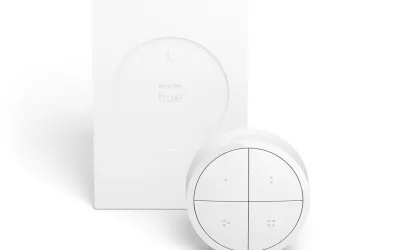
Smart lights create an annoying paradox: the more automated your lighting becomes, the more frustrating it is when you just want to flip a switch. Voice control is too slow for a quick "lights on." Reaching for your phone is absurd. And traditional smart switches require rewiring. The Philips Hue Tap Dial Switch aims to solve this with a beautifully designed, battery-free smart switch that combines four programmable buttons with a rotary dimming dial.
At $49.99, it's an expensive light switch by any measure — and it requires a Hue Bridge ($59.99) that you may not already own. But after using the Tap Dial as my primary bedroom and living room light controller for three months, I've come to appreciate it as one of the most thoughtfully designed smart home accessories available. The kinetic energy technology means genuinely zero batteries forever, the rotary dial is intuitive for dimming, and the magnetic mount makes it both a wall switch and a portable remote.
Design & Build
This is the best-looking smart switch you can buy, full stop. The Tap Dial is a circular disc about 3.5 inches in diameter and half an inch thick, available in black or white. The outer ring is the rotary dimming dial with a subtly textured surface that feels satisfying to turn. The inner face is divided into four button quadrants with a clean, minimal aesthetic. Small dots between the buttons are the only visual indicators of the button divisions — no ugly labels or icons.
Build quality is exceptional. The matte finish resists fingerprints, the buttons have a satisfying tactile click when pressed, and the rotary dial turns with smooth, weighted resistance that feels premium. Pick it up and you immediately understand why it costs $50 — this is a precisely engineered piece of industrial design, not a cheap plastic remote.
The magnetic mounting system is clever and practical. A slim metal plate adheres to your wall (adhesive included, screws optional), and the Tap Dial attaches magnetically. It sits flush enough to look like a permanent wall switch, but lifts off easily when you want to use it as a handheld remote from the couch. The magnet is strong enough that the switch won't fall off from accidental bumps but weak enough to remove intentionally with one hand. It's the kind of elegant solution that makes you wonder why every smart switch doesn't work this way.
Features
The Tap Dial's marquee feature is kinetic energy harvesting. Each button press generates enough electricity through a tiny internal generator to power the Zigbee 3.0 radio transmission. No batteries. Not "long-lasting batteries" — literally no batteries, ever, for the lifetime of the switch. In three months of heavy daily use, the Tap Dial has never missed a beat due to power issues. This is genuinely impressive technology that removes the single biggest annoyance of wireless smart switches.
The four buttons are individually programmable through the Hue app. Each button can control:
- A single light or group — toggle on/off, set specific brightness, set specific color/temperature
- A Hue scene — activate any saved scene with one press
- Multiple actions — different actions on single press, double press, and long press (though this requires the Hue Labs formula)
The rotary dial controls brightness for whichever light or group was last activated by a button press. Turn clockwise to brighten, counterclockwise to dim. The dial has about 270 degrees of rotation from minimum to maximum brightness, giving you a reasonable range of adjustment.
As a Zigbee 3.0 device in the Friends of Hue program, the Tap Dial communicates directly with the Hue Bridge with very low latency. It can also be configured as a generic Zigbee switch in platforms like Home Assistant via the ZHA or Zigbee2MQTT integrations, though the rotary dial support varies by platform. There's no WiFi, no Bluetooth, and no direct Alexa or Google integration — it's Hue Bridge or compatible Zigbee coordinators only.
Performance
Response time is excellent. Button presses activate lights in under 200 milliseconds — fast enough that it feels instant. There's no perceptible delay between pressing a button and seeing your lights respond, which is critical for a physical switch to feel natural. The Zigbee 3.0 protocol and direct Bridge communication keep latency consistent regardless of your WiFi network's condition, which is a real advantage over WiFi-based switches.
The rotary dial works well for general brightness adjustments. Turning it smoothly ramps brightness up or down in a way that feels natural and responsive. However, fine-grained dimming adjustments can be tricky. The dial doesn't have detents or haptic feedback, so setting a precise brightness level (say, exactly 40%) requires careful, slow rotation. For most practical use — "make it brighter" or "dim it down for a movie" — it works great. For exact brightness targeting, you're better off using the app.
Range has been solid throughout my home. The Tap Dial in my bedroom (about 35 feet from my Hue Bridge through two walls) has never failed to trigger. Since Zigbee signals mesh through other Hue devices, the effective range depends on your Hue ecosystem — more bulbs means better coverage. I've had zero missed button presses or dial adjustments in three months of daily use.
The kinetic energy system has been completely reliable. I was initially skeptical — would a gentle press generate enough power? — but even light taps consistently activate the switch. The mechanism does produce a slightly louder click than a normal button press, which is the only minor aesthetic compromise of the kinetic technology.
Ease of Use
Physical installation takes about 30 seconds: peel the adhesive backing off the mounting plate, press it against your wall, and magnetically attach the Tap Dial. Done. No wiring, no tools, no holes to drill (unless you prefer the screw mount for permanence). It's the easiest physical installation of any smart home device I've reviewed.
Software configuration is where things get more complicated. Adding the Tap Dial to your Hue Bridge is straightforward — press any button to put it in pairing mode, and the Hue app discovers it automatically. But programming the buttons is surprisingly unintuitive. The Hue app buries switch configuration under Accessories, and the interface for assigning actions to buttons isn't immediately obvious. You select a button, then choose what it controls, then set the action — but the workflow feels backwards and requires too many taps.
The bigger frustration is the limitations of button programming. You can't easily set up complex automation sequences from a single button press through the Hue app alone. Want one button to turn on the living room lights to 70%, set them to warm white, and turn off the bedroom lights? That requires creating a specific scene first and then assigning it to the button, or using Hue Labs formulas that feel like workarounds. Users comfortable with Home Assistant can bypass these limitations entirely through Zigbee integration, but the out-of-box Hue app experience for button configuration leaves room for improvement.
Day-to-day use, once configured, is excellent. Press a button, lights respond. Turn the dial, brightness adjusts. It becomes muscle memory within a day.
Value
At $49.99, the Hue Tap Dial is expensive for what is essentially a light switch remote. The previous-generation Hue Dimmer Switch costs $27.95 and offers four buttons (without the dial) with a CR2450 battery that lasts about 3 years. A Lutron Aurora dimmer — which replaces a toggle switch and works with Hue — is $39.95. Even within the Hue ecosystem, you're paying a premium for the kinetic technology and rotary dial.
And then there's the elephant in the room: the Hue Bridge requirement. If you're not already in the Hue ecosystem, add $59.99 for the bridge, bringing your total investment to $110 just for a light switch and its hub. That's a tough sell on its own, though the Bridge unlocks the entire Hue accessory ecosystem.
The value argument for the Tap Dial rests on two things: the kinetic energy technology and the build quality. Never changing a battery — not in 3 years, not in 10 years, never — is a genuine quality-of-life improvement, especially for switches mounted in hard-to-reach places. And the premium design and rotary dial make it genuinely pleasant to use in a way that cheaper switches aren't. If you're already invested in the Hue ecosystem and you want the best-feeling, most elegant physical controller for your lights, the Tap Dial justifies its price. If you're starting from scratch, the total cost of entry is hard to swallow.
Pros
- Kinetic energy harvesting means zero batteries for the entire lifespan of the switch — never replace a battery again
- Stunning industrial design with a premium matte finish that looks elegant on any wall
- Rotary dial provides intuitive, tactile brightness control that voice commands and apps can't replicate
- Magnetic mount works as both a permanent wall switch and a detachable handheld remote
- Sub-200ms response time via Zigbee 3.0 makes light control feel instant and reliable
Cons
- At $49.99 it's expensive for a light switch accessory, especially when the $27.95 Hue Dimmer does most of the same job
- Requires a Hue Bridge ($59.99) — won't work standalone or with other Zigbee systems without advanced setup
- Button programming through the Hue app is unintuitive and limited for complex automation scenarios
- Rotary dial lacks detents or haptic feedback, making precise brightness targeting difficult
Final Grade
The Philips Hue Tap Dial Switch is a beautifully engineered smart switch that solves the "how do I control smart lights physically?" problem with elegance. The kinetic energy technology is genuinely impressive and eliminates battery anxiety forever. The rotary dial provides intuitive brightness control that voice commands and phone apps can't match. And the magnetic mount design makes it both a permanent wall switch and a portable remote in one device.
The downsides are predictable: it's expensive at $50, it only works within the Hue ecosystem (or compatible Zigbee coordinators), and programming buttons through the Hue app is more cumbersome than it should be. The rotary dial can be imprecise for fine adjustments. And if you don't already own a Hue Bridge, the total cost of entry climbs to $110. But for existing Hue users who want a premium physical control for their lights — particularly in bedrooms, living rooms, or anywhere you want instant, tactile light control without reaching for your phone — the Tap Dial is the best option available. The kinetic energy technology alone makes it worth the investment.